Products

Solutions

Pricing

Free Trial

Blog

Demos & Recordings

Webinars

Events

Contact Us

DVW Analytics
  • Products
    • DVW Connectors for SAP >
      • DVW Alteryx Connector for SAP
      • DVW KNIME Connector for SAP
      • DVW Dataiku Connector for SAP
    • DVW Flow Tool >
      • DVW Flow Tool
      • DVW Employee Master Data Migration for SAP Solutions
    • DVW RPA Tools for SAP >
      • DVW Alteryx RPA Tools for SAP
      • DVW KNIME RPA Tools for SAP
      • DVW Flow Tool RPA Tools for SAP
  • Solutions
    • SAP Analytics
    • SAP Data Migration
    • SAP Process Automation
    • SAP Data for AI and Machine Learning
  • Pricing
    • DVW Connectors for SAP >
      • DVW Alteryx Connector for SAP Pricing
      • DVW KNIME Connector for SAP Pricing
      • DVW Dataiku Connector for SAP Pricing
    • DVW Flow Tool >
      • DVW Flow Tool Pricing
    • DVW RPA Tools for SAP >
      • DVW RPA Tools Pricing
  • Free Trial
  • Resources
    • About Us
    • Customers
    • Partners
    • Resellers
    • Services
    • Help Centre
    • Sample Workflows
    • License
  • Insights
    • Blog
    • SAP Data Models >
      • SAP FI/CO Table Relationships - Interactive Data Model Diagram
      • SAP SD Table Relationships - Interactive Data Model Diagram
      • SAP Inventory Management Table Relationships - Interactive Data Model Diagram
      • SAP Purchasing Table Relationships - Interactive Data Model Diagram
      • SAP PP Table Relationships - Interactive Data Model Diagram
      • SAP QM Table Relationships - Interactive Data Model Diagram
      • SAP PM Table Relationships - Interactive Data Model Diagram
      • SAP WM Table Relationships - Interactive Data Model Diagram
      • SAP HCM Table Relationships - Interactive Data Model Diagram
      • SAP PS Table Relationships - Interactive Data Model Diagram
    • Demos & Recordings >
      • DVW Connectors for SAP >
        • DVW Alteryx Connector for SAP Demos
        • DVW KNIME Connector for SAP Demos
        • DVW Dataiku Connector for SAP Demos
      • DVW Flow Tool >
        • DVW Flow Tool Demos
      • DVW RPA Tools for SAP >
        • DVW RPA Tools for SAP Demos
    • Webinars
    • Events
  • Contact Us

Blog

The most important SAP Purchasing (MM-PUR) tables for users of  Alteryx, KNIME, Dataiku, Microsoft, Databricks, Snowflake & more

2/4/2026

 
Picture

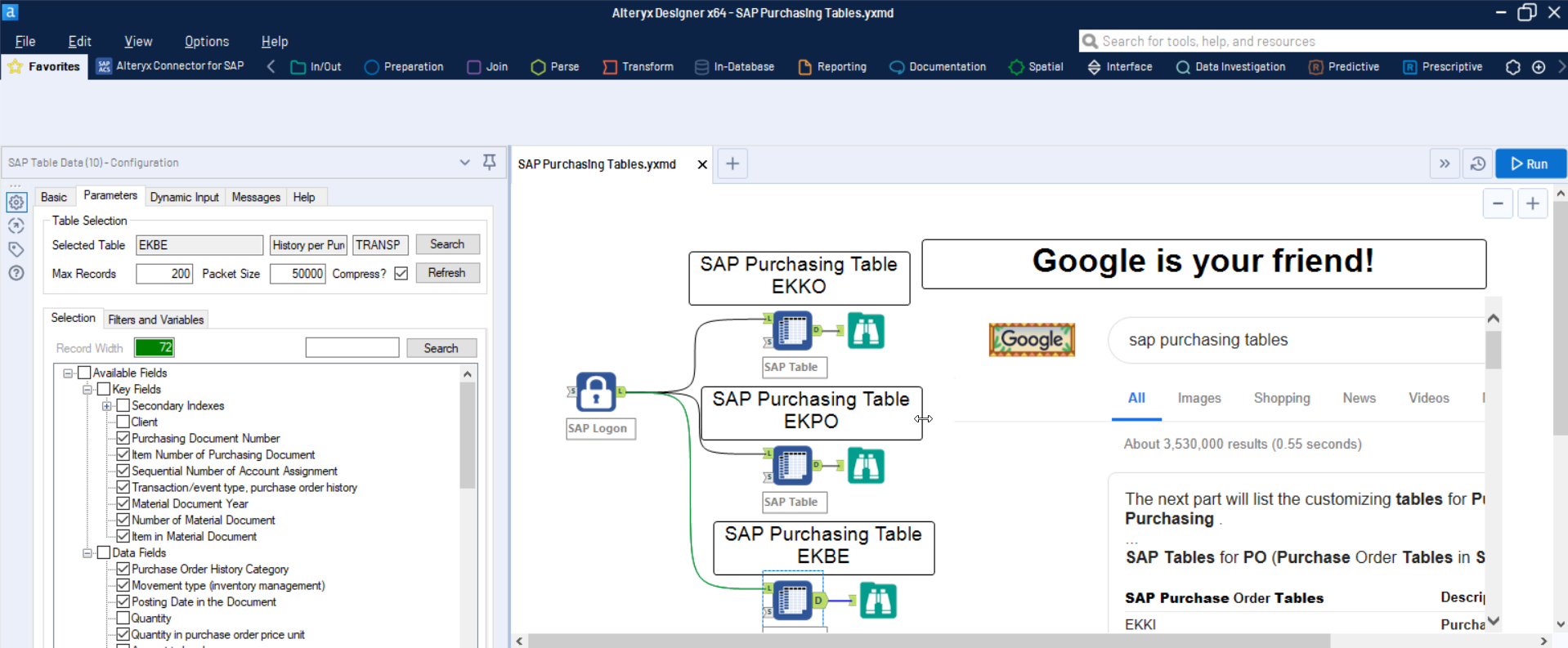
In this blog we identify the most important SAP Purchasing (MM-PUR) tables for users of:

  • Alteryx and the DVW Alteryx Connector for SAP
  • KNIME and the DVW KNIME Connector for SAP
  • Dataiku and the DVW Dataiku Connector for SAP
  • Power BI, Tableau, Databricks, Snowflake and the DVW Flow Tool

These tables cover the full procure-to-pay lifecycle, from purchase requisitions and purchase orders through to goods receipts and invoice verification, along with the vendor master data, purchasing info records and configuration tables you will need to build complete procurement reporting and analytics workflows.

SAP Purchasing (MM-PUR) tables are found in the following SAP systems:

  • SAP ECC
  • SAP ERP
  • SAP S/4HANA

SAP Purchasing (MM-PUR) Transaction Tables

Purchase Requisition Tables

Purchase requisitions are internal documents requesting the procurement of materials or services. They are created manually by users or generated automatically by MRP.

EBAN - Purchase Requisition Item. Contains one row per requisition item with fields such as requisition number (BANFN), item number (BNFPO), material number (MATNR), plant (WERKS), requested quantity (MENGE), delivery date (LFDAT), requisition date (BADAT) and requisition type. This is your starting point for any procurement demand analysis. In S/4HANA, EBAN continues to be the primary purchase requisition table with the same structure.

EBKN - Purchase Requisition Account Assignment. Contains account assignment details for each requisition item, including cost centre (KOSTL), GL account (SAKTO), WBS element (PS_PSP_PNR) and order number (AUFNR). Join to EBAN on BANFN and BNFPO. Essential for analysing procurement spend by cost object.

Purchase Order Tables

The purchase order is the central transaction document in SAP Purchasing. It is created to formalise the procurement of materials or services from a vendor. SAP stores purchase order data across a header table, item table, scheduling table, history table and account assignment table.

EKKO - Purchasing Document Header. Contains one row per purchasing document with fields such as document number (EBELN), document type (BSART), vendor number (LIFNR), purchasing organisation (EKORG), purchasing group (EKGRP), document date (BEDAT) and currency (WAERS). This covers purchase orders, scheduling agreements and contracts. This is typically your primary purchasing transaction header table.

EKPO - Purchasing Document Item. Contains one row per line item within each purchasing document. Key fields include document number (EBELN), item number (EBELP), material number (MATNR), plant (WERKS), ordered quantity (MENGE), net price (NETPR), price unit (PEINH) and item category (PSTYP). Join to EKKO on EBELN. This is where material-level purchasing detail lives.

EKET - Scheduling Agreement Schedule Lines. Contains delivery schedule lines for each purchasing document item. Key fields include document number (EBELN), item number (EBELP), schedule line number (ETENR), delivery date (EINDT) and scheduled quantity (MENGE). Join to EKPO on EBELN and EBELP. Important for tracking delivery schedules against purchase orders and scheduling agreements.

EKBE - History per Purchasing Document. Contains the complete history of goods receipts, invoice receipts and other follow-on documents for each purchasing document item. Key fields include document number (EBELN), item number (EBELP), history category (VGABE), material document number (BELNR), fiscal year (GJAHR), quantity (MENGE) and amount (WRBTR). Join to EKPO on EBELN and EBELP. Essential for purchase order completion analysis, three-way matching and GR/IR reconciliation. The history category (VGABE) distinguishes goods receipts (1), invoice receipts (2), and other document types.

EKKN - Account Assignment in Purchasing Document. Contains account assignment details for each purchasing document item, including cost centre (KOSTL), GL account (SAKTO), WBS element (PS_PSP_PNR), internal order (AUFNR) and asset number (ANLN1). Join to EKPO on EBELN and EBELP. Use this for procurement spend analysis by cost object.

Goods Receipt Tables

When goods are received against a purchase order, SAP creates a material document. The same MKPF and MSEG tables used in SAP Inventory Management record these goods receipt movements.

MKPF - Material Document Header. Contains one row per material document with fields such as document number (MBLNR), document year (MJAHR), posting date (BUDAT) and user name (USNAM). Join to MSEG on MBLNR and MJAHR. In a purchasing context, filter for goods receipt movement types (such as 101 and 103) to isolate purchase order receipts.

MSEG - Material Document Line Item. Contains one row per line item within each material document. Key fields include document number (MBLNR), year (MJAHR), line item (ZEILE), material number (MATNR), plant (WERKS), storage location (LGORT), movement type (BWART), quantity (MENGE) and purchase order reference (EBELN, EBELP). The purchase order fields allow you to join goods receipt lines back to EKPO for complete procurement tracking. In S/4HANA, MSEG exists as a compatibility view over MATDOC.

Invoice Verification Tables

Invoice verification (also known as logistics invoice verification or LIV) is the final step in the procure-to-pay cycle. When a vendor invoice is received, SAP records it against the corresponding purchase order.

RBKP - Document Header: Invoice Receipt. Contains one row per invoice document with fields such as document number (BELNR), fiscal year (GJAHR), invoice date (BLDAT), posting date (BUDAT), vendor number (LIFNR), gross amount (RMWWR) and currency (WAERS). This is your starting point for accounts payable and invoice analysis.

RSEG - Document Item: Incoming Invoice. Contains one row per line item within each invoice document. Key fields include document number (BELNR), fiscal year (GJAHR), line item (BUZEI), purchase order number (EBELN), purchase order item (EBELP), amount (WRBTR) and quantity (MENGE). Join to RBKP on BELNR and GJAHR. Join to EKPO on EBELN and EBELP to link invoices back to purchase orders for three-way match reporting.

SAP Purchasing (MM-PUR) Master Data Tables

Purchasing Info Record Tables

Purchasing info records store the relationship between a material and a vendor, including pricing, lead times and purchasing conditions. They are maintained per purchasing organisation.

EINA - Purchasing Info Record: General Data. Contains one row per material-vendor combination with fields such as info record number (INFNR), vendor number (LIFNR), material number (MATNR) and material group (MATKL). This is the general (cross-purchasing-organisation) level of the info record.

EINE - Purchasing Info Record: Purchasing Organisation Data. Contains purchasing organisation-specific data for each info record, including net price (NETPR), price unit (PEINH), planned delivery time (APLFZ), minimum order quantity (MINBM) and effective price date. Join to EINA on INFNR. This table is essential for analysing vendor pricing and lead times by purchasing organisation.

Vendor Master Tables (SAP ECC)

In SAP ECC, vendor master data is stored in a set of LF* tables. These tables also exist in SAP S/4HANA as compatibility views, so queries against them will continue to work. However, the underlying data in S/4HANA is stored in the Business Partner tables described below.

LFA1 - Vendor Master (General Section). Contains client-level vendor data that is not specific to any company code or purchasing organisation. Key fields include vendor number (LIFNR), name (NAME1), country (LAND1), city (ORT01) and address number (ADRNR). This is typically your primary vendor dimension table.

LFB1 - Vendor Master (Company Code). Contains vendor data specific to a company code, such as reconciliation account (AKONT), payment terms (ZTERM) and payment methods (ZWELS). Join to LFA1 on LIFNR.

LFM1 - Vendor Master (Purchasing Organisation). Contains vendor data specific to a purchasing organisation, including order currency (WAERS), payment terms (ZTERM), incoterms (INCO1) and planned delivery time (APLFZ). Join to LFA1 on LIFNR. This is the purchasing-specific view of the vendor master.

LFBK - Vendor Master (Bank Details). Contains bank account details for each vendor, including bank country (BANKS), bank key (BANKL), bank account number (BANKN) and IBAN. Join to LFA1 on LIFNR. Used in payment processing and bank detail reporting.

ADRC - Address Data. Contains detailed address information including street, city, postal code, region and country. Join to LFA1 using the address number (ADRNR) to enrich vendor data with full address details for geographic and spend-by-region reporting.

Business Partner Tables (SAP S/4HANA)

In SAP S/4HANA, SAP replaced the separate customer and vendor master data models with a unified Business Partner (BP) model. All vendors are now created as Business Partners first, with Customer Vendor Integration (CVI) mapping them to the traditional LIFNR vendor number. If you are building analytics workflows against an S/4HANA system, you should be aware of the following tables:

BUT000 - Business Partner: General Data. The S/4HANA equivalent of LFA1. Contains one row per Business Partner with fields such as partner number (PARTNER), name (NAME_ORG1 for organisations, NAME_FIRST / NAME_LAST for persons), partner type and creation date. This is the central table in the BP model.

BUT020 - Business Partner: Address Data. Contains address assignments for each Business Partner, linking to ADRC for the full address details. Join to BUT000 on PARTNER. In S/4HANA this replaces the direct LFA1-to-ADRC relationship used in ECC.

CVI_VEND_LINK - Customer Vendor Integration: Vendor Link. Maps a Business Partner number (PARTNER) to the traditional vendor number (LIFNR). This is the bridge table that allows you to join S/4HANA Business Partner data back to legacy vendor numbers used in purchasing transaction tables such as EKKO.

SAP Purchasing (MM-PUR) Configuration Data Tables

Configuration tables (also known as customising tables) contain the settings and descriptions that define how your SAP Purchasing module behaves. These are small, slowly changing tables that are useful for decoding the values stored in transaction and master data tables. The configuration tables listed below apply to both SAP ECC and SAP S/4HANA.

T024 - Purchasing Groups. Contains the list of purchasing groups configured in your system. Each purchasing group represents a buyer or group of buyers responsible for specific procurement activities. Join to EKKO or EKPO using the purchasing group field (EKGRP) to decode buyer assignments in your reports.

T024E - Purchasing Organisations. Contains the list of purchasing organisations configured in your system. Join to EKKO using the purchasing organisation field (EKORG) to decode organisational assignments.

T161 - Purchasing Document Types. Contains the list of purchasing document types configured in your system (such as standard purchase order, framework order, scheduling agreement). Join to EKKO using the document type field (BSART) to decode document types in your reports.

T161T - Purchasing Document Types: Texts. Contains the language-specific descriptions for each purchasing document type. Join to T161 on BSART and filter by language key (SPRAS) to get readable labels.

SAP S/4HANA Changes for Purchasing

Most SAP Purchasing tables remain the same in S/4HANA, but there are two important changes that affect analytics users.

MATDOC - Material Document (S/4HANA). In S/4HANA, MATDOC replaces MKPF and MSEG as the primary table for material documents. MATDOC combines header and item data into a single table, making it simpler to query goods receipt data. Key fields are the same as MKPF and MSEG combined: document number (MBLNR), year (MJAHR), line item (ZEILE), material number (MATNR), plant (WERKS), movement type (BWART), quantity (MENGE) and purchase order reference (EBELN, EBELP).

NSDM_V_MSEG - Compatibility View for MSEG (S/4HANA). In S/4HANA, NSDM_V_MSEG is a CDS view that provides backwards compatibility with the classic MSEG structure. If your existing reports or workflows query MSEG, they will typically be redirected to this view automatically. For new development against S/4HANA, use MATDOC directly for better performance.

Explore SAP Purchasing Tables with a DVW Connector

The fastest way to explore SAP Purchasing tables is to connect directly to your SAP system from your preferred analytics platform. DVW Connectors let you browse available tables, preview fields and extract data without writing any ABAP code. All DVW products support both SAP ECC and SAP S/4HANA.

To see how all 27 tables in this blog connect to each other, visit our SAP Purchasing Table Relationships page for an interactive data model diagram with join keys and ECC vs S/4HANA compatibility.

All DVW products include a 30-day free trial with full functionality, so you can start working with these tables right away. Visit our Free Trial page to get started, or explore our Help Centre for detailed documentation on connecting to SAP Purchasing tables.

Next Steps

See these SAP Purchasing tables in action. Register for a 30-day free trial and start extracting procurement and purchasing data from your SAP system today.

Free Trial Pricing Contact Us

Comments are closed.

    RSS Feed

    Categories

    All
    AI & Machine Learning
    Alteryx Connector
    Audit
    Dataiku Connector
    Data Migration
    Flow Tool
    KNIME Connector
    Process Automation
    Product Updates
    Reporting & Analytics
    RPA Tools For SAP
    SAP Data Extraction
    SAP S/4HANA
    SAP Tables
    Use Cases
    Webinar

    Archives

    May 2026
    April 2026
    March 2026
    February 2026
    December 2025
    November 2025
    October 2025
    August 2025
    July 2025
    October 2024
    September 2024
    July 2024
    June 2024
    February 2024
    October 2023
    June 2023
    May 2023
    March 2023
    February 2023
    January 2023
    June 2022
    March 2022
    February 2022
    December 2021
    November 2021
    October 2021
    May 2021
    April 2021
    December 2020
    October 2020
    June 2020
    February 2020
    September 2019
    June 2019
    August 2018
    June 2018

Products​
​SAP Connectors
DVW Alteryx Connector for SAP
DVW KNIME Connector for SAP
​DVW Dataiku Connector for SAP

DVW Flow Tool
DVW Flow Tool

RPA Tools for SAP
DVW Alteryx RPA Tools for SAP
DVW KNIME RPA Tools for SAP
DVW Flow Tool RPA Tools for SAP
Resources & Insights
Blog
Webinars
Watch Demos
Events
Solutions
SAP Analytics
SAP Data Migration
SAP Process Automation
SAP Data for AI and ML
Company
About Us
Contact Us
Pricing
Free Trial

[email protected]
Get started
​Start Free Trial
View Pricing
Book a Demo
DVW Analytics gives business users and technical teams direct read and write access to SAP data from Alteryx, KNIME, Dataiku, Power BI, Databricks, Snowflake, and more. Trusted by 500+ organizations worldwide.
© COPYRIGHT 2003 - 2026 DE VILLIERS WALTON LIMITED. ALL RIGHTS RESERVED.
Privacy Policy
Cookie Policy
De Villiers Walton Limited. Registered in England and Wales. Company No. 04638006. VAT No. GB 807714429. Registered Office:  Ground Floor Marlborough House, 298 Regents Park Road, London, N3 2SZ, United Kingdom

SAP® Business Suite, SAP® BusinessObjects™, SAP® BW, SAP® SuccessFactors are the trademarks or registered trademarks of SAP SE in Germany and in several other countries.
  • Products
    • DVW Connectors for SAP >
      • DVW Alteryx Connector for SAP
      • DVW KNIME Connector for SAP
      • DVW Dataiku Connector for SAP
    • DVW Flow Tool >
      • DVW Flow Tool
      • DVW Employee Master Data Migration for SAP Solutions
    • DVW RPA Tools for SAP >
      • DVW Alteryx RPA Tools for SAP
      • DVW KNIME RPA Tools for SAP
      • DVW Flow Tool RPA Tools for SAP
  • Solutions
    • SAP Analytics
    • SAP Data Migration
    • SAP Process Automation
    • SAP Data for AI and Machine Learning
  • Pricing
    • DVW Connectors for SAP >
      • DVW Alteryx Connector for SAP Pricing
      • DVW KNIME Connector for SAP Pricing
      • DVW Dataiku Connector for SAP Pricing
    • DVW Flow Tool >
      • DVW Flow Tool Pricing
    • DVW RPA Tools for SAP >
      • DVW RPA Tools Pricing
  • Free Trial
  • Resources
    • About Us
    • Customers
    • Partners
    • Resellers
    • Services
    • Help Centre
    • Sample Workflows
    • License
  • Insights
    • Blog
    • SAP Data Models >
      • SAP FI/CO Table Relationships - Interactive Data Model Diagram
      • SAP SD Table Relationships - Interactive Data Model Diagram
      • SAP Inventory Management Table Relationships - Interactive Data Model Diagram
      • SAP Purchasing Table Relationships - Interactive Data Model Diagram
      • SAP PP Table Relationships - Interactive Data Model Diagram
      • SAP QM Table Relationships - Interactive Data Model Diagram
      • SAP PM Table Relationships - Interactive Data Model Diagram
      • SAP WM Table Relationships - Interactive Data Model Diagram
      • SAP HCM Table Relationships - Interactive Data Model Diagram
      • SAP PS Table Relationships - Interactive Data Model Diagram
    • Demos & Recordings >
      • DVW Connectors for SAP >
        • DVW Alteryx Connector for SAP Demos
        • DVW KNIME Connector for SAP Demos
        • DVW Dataiku Connector for SAP Demos
      • DVW Flow Tool >
        • DVW Flow Tool Demos
      • DVW RPA Tools for SAP >
        • DVW RPA Tools for SAP Demos
    • Webinars
    • Events
  • Contact Us