Products

Solutions

Pricing

Free Trial

Blog

Demos & Recordings

Webinars

Events

Contact Us

DVW Analytics
  • Products
    • DVW Connectors for SAP >
      • DVW Alteryx Connector for SAP
      • DVW KNIME Connector for SAP
      • DVW Dataiku Connector for SAP
    • DVW Flow Tool >
      • DVW Flow Tool
      • DVW Employee Master Data Migration for SAP Solutions
    • DVW RPA Tools for SAP >
      • DVW Alteryx RPA Tools for SAP
      • DVW KNIME RPA Tools for SAP
      • DVW Flow Tool RPA Tools for SAP
  • Solutions
    • SAP Analytics
    • SAP Data Migration
    • SAP Process Automation
    • SAP Data for AI and Machine Learning
  • Pricing
    • DVW Connectors for SAP >
      • DVW Alteryx Connector for SAP Pricing
      • DVW KNIME Connector for SAP Pricing
      • DVW Dataiku Connector for SAP Pricing
    • DVW Flow Tool >
      • DVW Flow Tool Pricing
    • DVW RPA Tools for SAP >
      • DVW RPA Tools Pricing
  • Free Trial
  • Resources
    • About Us
    • Customers >
      • Johnson & Johnson Customer Story
      • AGC Customer Story
      • Brightstar Customer Story
      • Vector Logistics Customer Story
      • International Bank Customer Story
      • KPMG (Tax practice, state income tax apportionment) Customer Story
    • Partners
    • Resellers
    • Services
    • Help Centre
    • Sample Workflows >
      • Alteryx Sample Workflows for SAP
      • KNIME Workflow Templates for SAP
      • Flow Tool Sample Workflows
    • License
    • FAQ
  • Insights
    • Blog
    • SAP Data Models >
      • SAP FI/CO Table Relationships - Interactive Data Model Diagram
      • SAP SD Table Relationships - Interactive Data Model Diagram
      • SAP Inventory Management Table Relationships - Interactive Data Model Diagram
      • SAP Purchasing Table Relationships - Interactive Data Model Diagram
      • SAP PP Table Relationships - Interactive Data Model Diagram
      • SAP QM Table Relationships - Interactive Data Model Diagram
      • SAP PM Table Relationships - Interactive Data Model Diagram
      • SAP WM Table Relationships - Interactive Data Model Diagram
      • SAP HCM Table Relationships - Interactive Data Model Diagram
      • SAP PS Table Relationships - Interactive Data Model Diagram
    • Demos & Recordings >
      • DVW Connectors for SAP >
        • DVW Alteryx Connector for SAP Demos
        • DVW KNIME Connector for SAP Demos
        • DVW Dataiku Connector for SAP Demos
      • DVW Flow Tool >
        • DVW Flow Tool Demos
      • DVW RPA Tools for SAP >
        • DVW RPA Tools for SAP Demos
    • Webinars
    • Events
  • Contact Us

Blog

The most important SAP Inventory Management tables for users of  Alteryx, KNIME, Dataiku, Microsoft, Databricks, Snowflake & more

3/4/2026

 
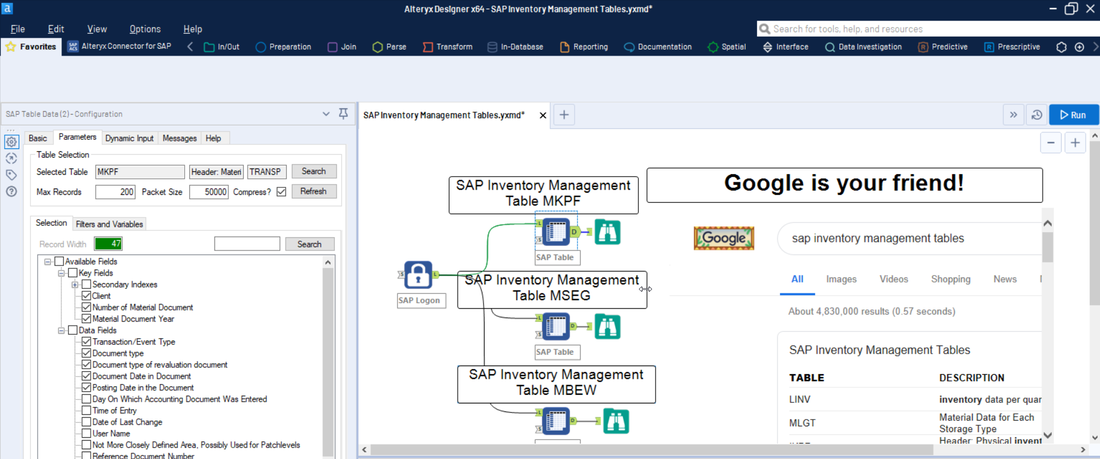
Picture

In this blog we identify the most important SAP Inventory Management tables for users of:

  • Alteryx and the DVW Alteryx Connector for SAP
  • KNIME and the DVW KNIME Connector for SAP
  • Dataiku and the DVW Dataiku Connector for SAP
  • Power BI, Tableau, Databricks, Snowflake and the DVW Flow Tool

These tables cover the full inventory lifecycle, from goods receipts and goods issues through to physical inventory counts, along with the material master data and configuration tables you will need to build complete inventory management reporting and analytics workflows.

SAP Inventory Management tables are found in the following SAP systems:

  • SAP ECC
  • SAP ERP
  • SAP S/4HANA

SAP Inventory Management Transaction Tables

Material Document Tables

The material document is the central object in SAP Inventory Management. Every goods movement (goods receipt, goods issue, stock transfer or transfer posting) creates a material document with a header and one or more line items.

MKPF - Material Document Header. Contains one row per material document with fields such as document number (MBLNR), document year (MJAHR), posting date (BUDAT), movement type (not stored here, see MSEG) and user name (USNAM). This is your starting point for any inventory movement analysis. Join to MSEG on MBLNR and MJAHR.

MSEG - Material Document Line Item. Contains one row per line item within each material document. Key fields include document number (MBLNR), document year (MJAHR), line item (ZEILE), material number (MATNR), plant (WERKS), storage location (LGORT), movement type (BWART), quantity (MENGE), unit of measure (MEINS) and amount in local currency (DMBTR). Join to MKPF on MBLNR and MJAHR for document header details. The movement type field (BWART) is critical for distinguishing goods receipts (101, 103), goods issues (201, 261), stock transfers (301, 311) and returns. In S/4HANA, MSEG still exists as a compatibility view but the primary data is stored in MATDOC.

Material Valuation Tables

Material valuation tables store the current and historical value of inventory at the valuation area level. These are essential for inventory value reporting and cost analysis.

MBEW - Material Valuation. Contains one row per material per valuation area with fields such as material number (MATNR), valuation area (BWKEY), valuation class (BKLAS), standard price (STPRS), moving average price (VERPR), total stock value (SALK3) and price control indicator (VPRSV). Join to MARA on MATNR for material master details. This is a key table for inventory value reporting.

MBEWH - Material Valuation: History. Contains historical valuation records by period. Key fields include material number (MATNR), valuation area (BWKEY), valuation type (BWTAR), fiscal year (LFGJA) and period (LFMON). Use this for period-end inventory valuation analysis and comparing stock values over time.

Physical Inventory Document Tables

Physical inventory documents record the results of stock counts. SAP creates a document when a count is initiated, and the counted quantities are entered against each item.

IKPF - Physical Inventory Document Header. Contains one row per physical inventory document with fields such as document number (IBLNR), fiscal year (GJAHR), plant (WERKS), posting date (BUDAT) and physical inventory type. Join to ISEG on IBLNR and GJAHR.

ISEG - Physical Inventory Document Item. Contains one row per item in a physical inventory document. Key fields include document number (IBLNR), fiscal year (GJAHR), line item (ZEESSION), material number (MATNR), plant (WERKS), storage location (LGORT), book quantity (MENGE_BUC), counted quantity (MENGE_ZAE) and difference quantity (MENGE_DIF). Join to IKPF on IBLNR and GJAHR. Use this for inventory accuracy analysis and cycle count reporting.

Stock Overview Tables

While MARD stores current stock by storage location, SAP also provides tables for special stocks and batch-level inventory.

MARD - Storage Location Data for Material. Contains current stock quantities by material, plant and storage location. Key fields include material number (MATNR), plant (WERKS), storage location (LGORT), unrestricted stock (LABST), quality inspection stock (INSME) and blocked stock (SPEME). This is the primary table for current stock level reporting. Join to MARA on MATNR for material descriptions.

MCHB - Batch Stocks. Contains stock quantities at the batch level for batch-managed materials. Key fields include material number (MATNR), plant (WERKS), storage location (LGORT), batch number (CHARG) and stock quantities (CLABS for unrestricted, CINSM for quality inspection, CSPEM for blocked). Use this when your materials are batch-managed and you need stock visibility at the batch level.

MSLB - Special Stocks with Vendor. Contains stock quantities for vendor consignment and subcontracting stock. Key fields include material number (MATNR), plant (WERKS), vendor number (LIFNR), special stock type and stock quantities. Use this for consignment stock and subcontracting reporting.

MSKU - Special Stocks with Customer. Contains stock quantities for customer consignment stock. Key fields include material number (MATNR), customer number (KUNNR) and stock quantities. Use this for customer consignment reporting.

MSKA - Sales Order Stock. Contains stock quantities reserved against specific sales orders. Key fields include material number (MATNR), plant (WERKS), sales order number (VBELN), sales order item (POSNR) and stock quantities. Use this for make-to-order and project stock reporting.

SAP Inventory Management Master Data Tables

Material Master Tables

The material master is the central master data object for inventory management. Material master data is split across multiple tables, each holding data for a different organizational level or functional area.

MARA - General Material Data. Contains one row per material with client-level data such as material number (MATNR), material type (MTART), material group (MATKL), base unit of measure (MEINS), gross weight (BRGEW) and net weight (NTGEW). This is your primary material dimension table.

MAKT - Material Descriptions. Contains language-specific descriptions for each material. Key fields include material number (MATNR) and language key (SPRAS). Join to MARA on MATNR and filter by SPRAS for the required language.

MARC - Plant Data for Material. Contains material data specific to a plant, including MRP settings, procurement type, safety stock and reorder point. Key fields include material number (MATNR), plant (WERKS), MRP type (DISMM), lot size (DISLS), safety stock (EISBE) and procurement type (BESKZ). This is essential for plant-level inventory planning analysis.

MARM - Units of Measure for Material. Contains alternative units of measure and conversion factors for each material. Key fields include material number (MATNR), alternative unit of measure (MEINH) and numerator/denominator for conversion (UMREZ, UMREN). Essential when materials are stocked in one unit but reported or ordered in another.

MVKE - Sales Data for Material. Contains sales organization-specific data for each material. Key fields include material number (MATNR), sales organization (VKORG) and distribution channel (VTWEG). Useful when combining inventory data with sales reporting.

Batch Master Tables

If your organization uses batch management, these tables store the batch-level master data.

MCH1 - Batches (if Batch Level = Material). Contains one row per batch per material. Key fields include material number (MATNR), batch number (CHARG) and batch creation date.

MCHA - Batches. Contains one row per batch per material per plant when batch level is set to plant. Key fields include material number (MATNR), plant (WERKS), batch number (CHARG).

SAP Inventory Management Configuration Tables

Configuration tables contain the settings and descriptions that define how your SAP Inventory Management module behaves. These are small, slowly changing tables useful for decoding values in transaction and master data tables. The configuration tables listed below apply to both SAP ECC and SAP S/4HANA.

T001W - Plants/Branches. Contains the list of plants configured in your SAP system, including plant name, company code assignment and address data. Key fields include plant (WERKS), name (NAME1) and company code (BUKRS). One of the most frequently joined configuration tables for inventory reporting.

T001L - Storage Locations. Contains the list of storage locations within each plant. Key fields include plant (WERKS) and storage location (LGORT). Join to MARD, MSEG or any inventory table to decode storage location names.

T001K - Valuation Areas. Contains the list of valuation areas, which in most SAP implementations map one-to-one with plants. Key fields include valuation area (BWKEY) and company code (BUKRS). Join to MBEW on BWKEY.

T023 / T023T - Material Groups and Descriptions. Contains the list of material group codes and their language-specific descriptions. Join to MARA using the material group field (MATKL) to categorise materials in your reports.

T134 / T134T - Material Types and Descriptions. Contains the list of material types (e.g. raw material, finished product, trading goods) and their descriptions. Join to MARA using the material type field (MTART).

T156 / T156T - Movement Types and Texts. Contains the list of movement type codes and their language-specific descriptions. Key fields include movement type (BWART) and language key (SPRAS). Join to MSEG on BWART to decode movement types in goods movement reports. This is one of the most important configuration tables for inventory analysis.

SAP S/4HANA Tables

SAP S/4HANA introduced MATDOC as the single material document table, replacing the MKPF/MSEG header-item split used in SAP ECC. This simplifies material document reporting by combining header and line item data in a single table.

MATDOC - Material Document (S/4HANA). The single source of truth for all goods movements in S/4HANA. MATDOC combines the header data from MKPF and the line item data from MSEG into one table. Key fields include document number (MBLNR), document year (MJAHR), line item (ZEILE), material number (MATNR), plant (WERKS), storage location (LGORT), movement type (BWART), quantity (MENGE), amount in local currency (DMBTR), posting date (BUDAT) and many additional fields previously split between MKPF and MSEG. In S/4HANA, MKPF and MSEG still exist as compatibility views, so existing queries will continue to work.

NSDM_V_MSEG - Material Document Segment View (S/4HANA). A compatibility view in S/4HANA that provides the same structure as the classic MSEG table. Use this if you need to maintain backward-compatible queries while benefiting from the MATDOC data model.

Explore SAP Inventory Management Tables with a DVW Connector

The fastest way to explore SAP Inventory Management tables is to connect directly to your SAP system from your preferred analytics platform. DVW Connectors let you browse available tables, preview fields and extract data without writing any ABAP code. All DVW products support both SAP ECC and SAP S/4HANA.

To see how all the tables in this blog connect to each other, visit our SAP Inventory Management Table Relationships page for an interactive data model diagram with join keys and ECC vs S/4HANA compatibility.

All DVW products include a 30-day free trial with full functionality, so you can start working with these tables right away. Visit our Free Trial page to get started, or explore our Help Centre for detailed documentation on connecting to SAP Inventory Management tables.

Next Steps

See these SAP Inventory Management tables in action. Register for a 30-day free trial and start extracting inventory and material document data from your SAP system today.

Free Trial Pricing Contact Us

Comments are closed.

    RSS Feed

    Categories

    All
    AI & Machine Learning
    Alteryx Connector
    Audit
    Dataiku Connector
    Data Migration
    Flow Tool
    KNIME Connector
    Process Automation
    Product Updates
    Reporting & Analytics
    RPA Tools For SAP
    SAP Data Extraction
    SAP S/4HANA
    SAP Tables
    Use Cases
    Webinar

    Archives

    July 2026
    June 2026
    May 2026
    April 2026
    March 2026
    February 2026
    December 2025
    November 2025
    October 2025
    August 2025
    July 2025
    October 2024
    September 2024
    July 2024
    June 2024
    February 2024
    October 2023
    June 2023
    May 2023
    March 2023
    February 2023
    January 2023
    October 2022
    March 2022
    February 2022
    December 2021
    November 2021
    October 2021
    May 2021
    April 2021
    December 2020
    June 2020
    February 2020
    September 2019
    June 2019
    August 2018
    June 2018

Products​
​SAP Connectors
DVW Alteryx Connector for SAP
DVW KNIME Connector for SAP
​DVW Dataiku Connector for SAP

DVW Flow Tool
DVW Flow Tool

RPA Tools for SAP
DVW Alteryx RPA Tools for SAP
DVW KNIME RPA Tools for SAP
DVW Flow Tool RPA Tools for SAP
Resources & Insights
Blog
Webinars
Watch Demos
​Customers

Events
Solutions
SAP Analytics
SAP Data Migration
SAP Process Automation
SAP Data for AI and ML
Company
About Us
Contact Us
Pricing
Free Trial

[email protected]
Get started
​Start Free Trial
View Pricing
Book a Demo
​DVW Analytics gives business users and technical teams direct access to SAP data from Alteryx, KNIME, Dataiku, Power BI, Databricks, Snowflake, and more. Trusted by 500+ enterprises worldwide.
© COPYRIGHT 2003 - 2026 DE VILLIERS WALTON LIMITED. ALL RIGHTS RESERVED.
Privacy Policy
Cookie Policy
De Villiers Walton Limited. Registered in England and Wales. Company No. 04638006. VAT No. GB 807714429. Registered Office:  Ground Floor Marlborough House, 298 Regents Park Road, London, N3 2SZ, United Kingdom

SAP and other SAP products and services mentioned herein as well as their respective logos are trademarks or registered trademarks of SAP SE (or an SAP affiliate company) in Germany and other countries. Alteryx is a registered trademark of Alteryx, Inc. KNIME is a registered trademark of KNIME AG. Dataiku is a registered trademark of Dataiku SAS. All other product, company, and brand names mentioned herein are the trademarks or registered trademarks of their respective owners and are used for identification purposes only.
  • Products
    • DVW Connectors for SAP >
      • DVW Alteryx Connector for SAP
      • DVW KNIME Connector for SAP
      • DVW Dataiku Connector for SAP
    • DVW Flow Tool >
      • DVW Flow Tool
      • DVW Employee Master Data Migration for SAP Solutions
    • DVW RPA Tools for SAP >
      • DVW Alteryx RPA Tools for SAP
      • DVW KNIME RPA Tools for SAP
      • DVW Flow Tool RPA Tools for SAP
  • Solutions
    • SAP Analytics
    • SAP Data Migration
    • SAP Process Automation
    • SAP Data for AI and Machine Learning
  • Pricing
    • DVW Connectors for SAP >
      • DVW Alteryx Connector for SAP Pricing
      • DVW KNIME Connector for SAP Pricing
      • DVW Dataiku Connector for SAP Pricing
    • DVW Flow Tool >
      • DVW Flow Tool Pricing
    • DVW RPA Tools for SAP >
      • DVW RPA Tools Pricing
  • Free Trial
  • Resources
    • About Us
    • Customers >
      • Johnson & Johnson Customer Story
      • AGC Customer Story
      • Brightstar Customer Story
      • Vector Logistics Customer Story
      • International Bank Customer Story
      • KPMG (Tax practice, state income tax apportionment) Customer Story
    • Partners
    • Resellers
    • Services
    • Help Centre
    • Sample Workflows >
      • Alteryx Sample Workflows for SAP
      • KNIME Workflow Templates for SAP
      • Flow Tool Sample Workflows
    • License
    • FAQ
  • Insights
    • Blog
    • SAP Data Models >
      • SAP FI/CO Table Relationships - Interactive Data Model Diagram
      • SAP SD Table Relationships - Interactive Data Model Diagram
      • SAP Inventory Management Table Relationships - Interactive Data Model Diagram
      • SAP Purchasing Table Relationships - Interactive Data Model Diagram
      • SAP PP Table Relationships - Interactive Data Model Diagram
      • SAP QM Table Relationships - Interactive Data Model Diagram
      • SAP PM Table Relationships - Interactive Data Model Diagram
      • SAP WM Table Relationships - Interactive Data Model Diagram
      • SAP HCM Table Relationships - Interactive Data Model Diagram
      • SAP PS Table Relationships - Interactive Data Model Diagram
    • Demos & Recordings >
      • DVW Connectors for SAP >
        • DVW Alteryx Connector for SAP Demos
        • DVW KNIME Connector for SAP Demos
        • DVW Dataiku Connector for SAP Demos
      • DVW Flow Tool >
        • DVW Flow Tool Demos
      • DVW RPA Tools for SAP >
        • DVW RPA Tools for SAP Demos
    • Webinars
    • Events
  • Contact Us